Insights
— Platform
Why annotations live on the image, not beside it.
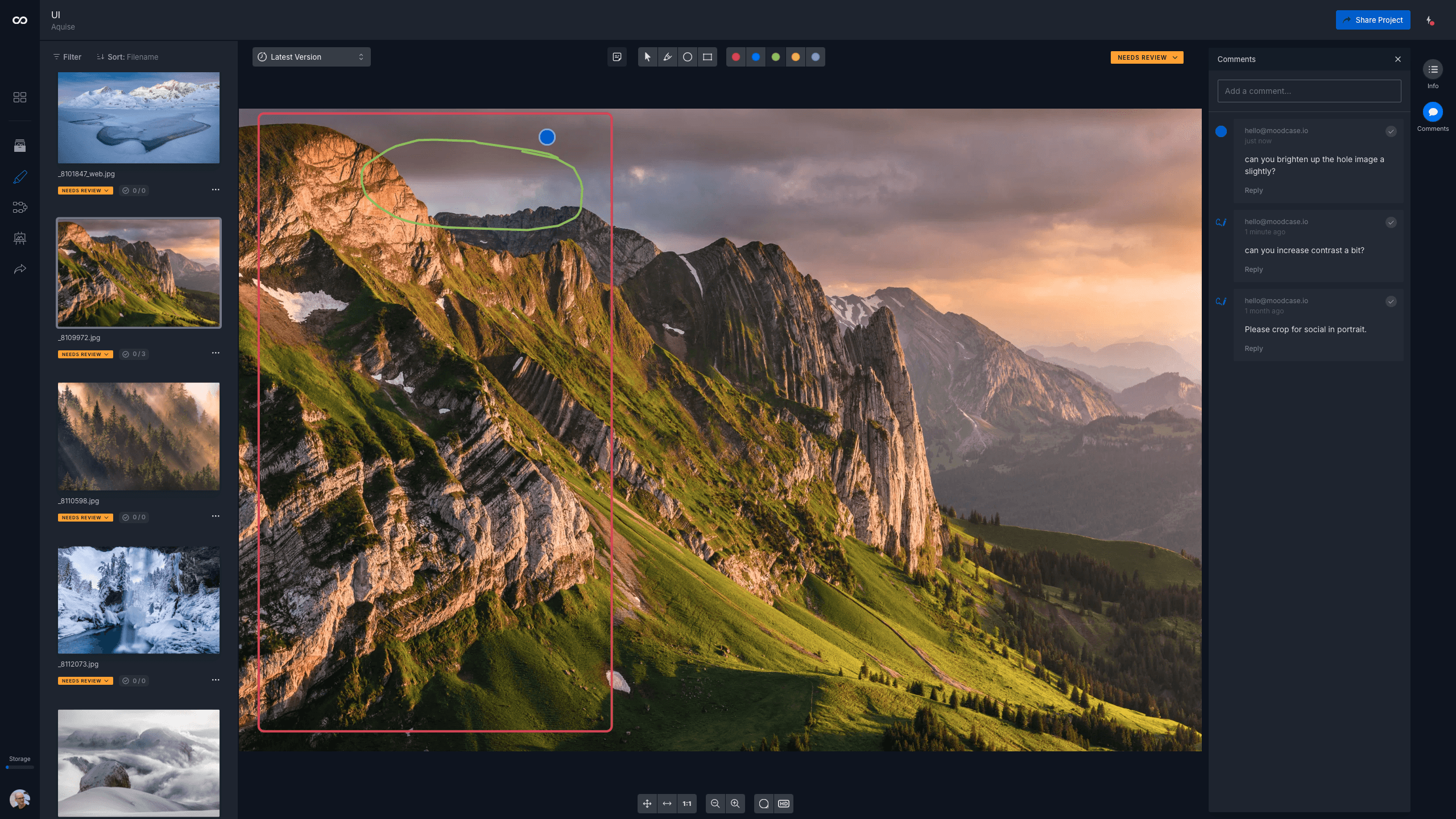
Where review feedback lives is a design choice. When a comment is pinned to the spot on the image it refers to, ambiguity collapses. When it lives in a side panel, an email thread, or a chat channel, ambiguity is preserved. The medium shapes the feedback. Annotations on the image are not a gallery feature added on top. They are a different design choice about where review information belongs.

Mathias Buschor
Co-Founder at moodcase
•
5
min read

Photo:
Tobias Ryser
How detached feedback creates a mapping problem
A campaign shoot delivers 500 images for review. Three people need to look at them. The art director, the brand manager, the social lead. The art director writes "image 47, tighter crop on the left" in an email. The photographer opens the gallery, scrolls to image 47, identifies which part is "the left," interprets which subject "tighter" refers to. Each step adds room for error.
The feedback exists. The link between the feedback and the image does not. The photographer holds the link in their head while they work, and the next reviewer rebuilds it from scratch when they read the same email later. The work of attaching the comment to the image happens many times, by many people, on every round.
Across three reviewers and 500 images, the mapping problem compounds. The result is a slower review and a higher error rate that no one can locate the source of.
External channels do not stay attached to the work
Feedback in an email, a chat thread, or a Slack channel lives in the channel. It does not live on the image. Move the image to a new project, archive the old gallery, or hand the work off to a different collaborator, and the feedback is left behind.
This is a quiet failure mode. The feedback was real at the time it was given. Six months later, the photographer pulls up the campaign to use one of the shots somewhere new. The image is there. The reason a previous selection was rejected is not.
A version of the same problem happens in real time. A new reviewer joins the project after the first round of comments. They open the gallery and see the images but not the discussion. They start asking questions that have already been answered.
Marked-up screenshots are parallel artifacts
The visual workaround is a marked-up screenshot. A PDF, a JPEG with arrows and circles, a sketch on top of the export. This is closer to the work than an email. It is still not on the image.
The screenshot is now a separate file that needs to be tracked alongside the original image. Two files where there should be one. When a new version of the image appears, the marked-up screenshot is stranded. It refers to a version of the work that no longer exists. The reviewer either re-creates the markup on the new version, or the markup becomes a historical document that drifts further from the image every round.
The discipline required to keep a screenshot in sync with its image is, in practice, the discipline of doing in-image review without the system to support it.
Versioning records what happened, not what was asked
A new file appears in the folder. The reviewer compares it to the previous version mentally. The instruction that produced the change does not travel with the file. Two rounds later, the original request is gone from the working memory of the team, even if it is still findable in someone's inbox.
This is the gap that produces the most common review failure. The version is technically delivered, but it does not answer what was actually asked. The team approves it because the change is broadly correct, and then notices in production that the specific request was missed.
The structural difference
Reviewing on the image is not a feature added on top of a gallery. It is a different design choice about where review information belongs.
When the comment is pinned to the spot it refers to, three things follow. The comment cannot become detached from the image. The location of the comment is unambiguous. The version that produced the response carries the comment forward, so reviewers can see what was asked alongside the answer.
In moodcase Studio, each annotation is recorded on the image itself, with a timestamp and the identity of the reviewer. Approvals are recorded the same way. Across rounds, annotations remain visible. What was asked stays attached to what was delivered. Visual Feedback is available on Plus plans and above.
The wider effect is on what gets said in the first place. When a comment has a precise location, reviewers leave more precise feedback. When feedback lives in an email, reviewers default to summary-level notes because that is what email format affords. Where review happens influences what review can ask for.
Detached feedback can be linked back to the image with discipline. A careful naming convention. A strict template. A numbered list. The discipline works until it doesn't, and the place it fails first is the moment with the most reviewers and the most images. The structural answer puts the link where it cannot break.
Who this matters to
This matters when review involves more than one stakeholder, more than one round, or more than one image. It matters less when the workflow is one approver, one image, one yes.
The question is not whether annotations on the image are useful. They are. The question is whether review feedback should live where it can be recovered after the fact, or where it cannot get lost in the first place.
Visual assets need more than a folder. See how moodcase handles the full workflow.
Try all features for 7 days. No credit card required.
Annotations
Review
Feedback Loops
Studios
RELATED

Visual assets for small creative teams.
Where review feedback lives is a design choice. Annotations on the image collapse ambiguity that detached feedback preserves.
When proofing is only part of the workflow.
Proofing tools handle selection. moodcase keeps the full project connected: review, approval, delivery, and structure beyond the handoff.