Insights
— Platform
Visual assets for small creative teams.
A creative team of eight manages 15,000 visual assets across a dozen clients. Finding images takes too long. Feedback moves through email. Delivery happens through unbranded transfer links. moodcase provides structured visual asset management built for teams at this scale.

Mathias Buschor
Co-Founder at moodcase
•
6
min read

When shared drives stop working for creative teams
Most small creative teams start with shared drives and cloud storage. The arrangement works until the visual library crosses a threshold, typically between 5,000 and 15,000 assets, where the folder structure stops being navigable and the number of people touching the assets makes informal coordination unreliable.
The symptoms are consistent. A designer searches for a campaign image and cannot find it without asking the person who uploaded it. A client requests a specific asset from a completed project and the account manager spends twenty minutes in a folder tree. A photographer delivers updated visuals and the team is not sure which version replaced which. An external partner needs access to a specific set of images and the only option is a shared link that exposes the entire folder.
These are not failures of the team. They are failures of the system. Shared drives organize by filename and folder structure. Visual assets need metadata, workflow context, and access boundaries that folders cannot provide.
What structured visual asset handling gives a creative team
In moodcase, visual assets are organized with the structure that creative teams actually need.
Finding assets by what they are, not where they are stored. Assets carry metadata: keywords, AI tags, color labels, workflow status, ratings, copyright, usage rights, client, project. On team plans, moodcase global search retrieves any asset across the workspace by any of these attributes.
Controlling who sees what without duplicating files. Granular link permissions define access at the gallery level. A client sees the approved deliverables. A retoucher sees the working set. An external partner sees the specific assets they need. Each view is controlled without creating copies or separate folders.
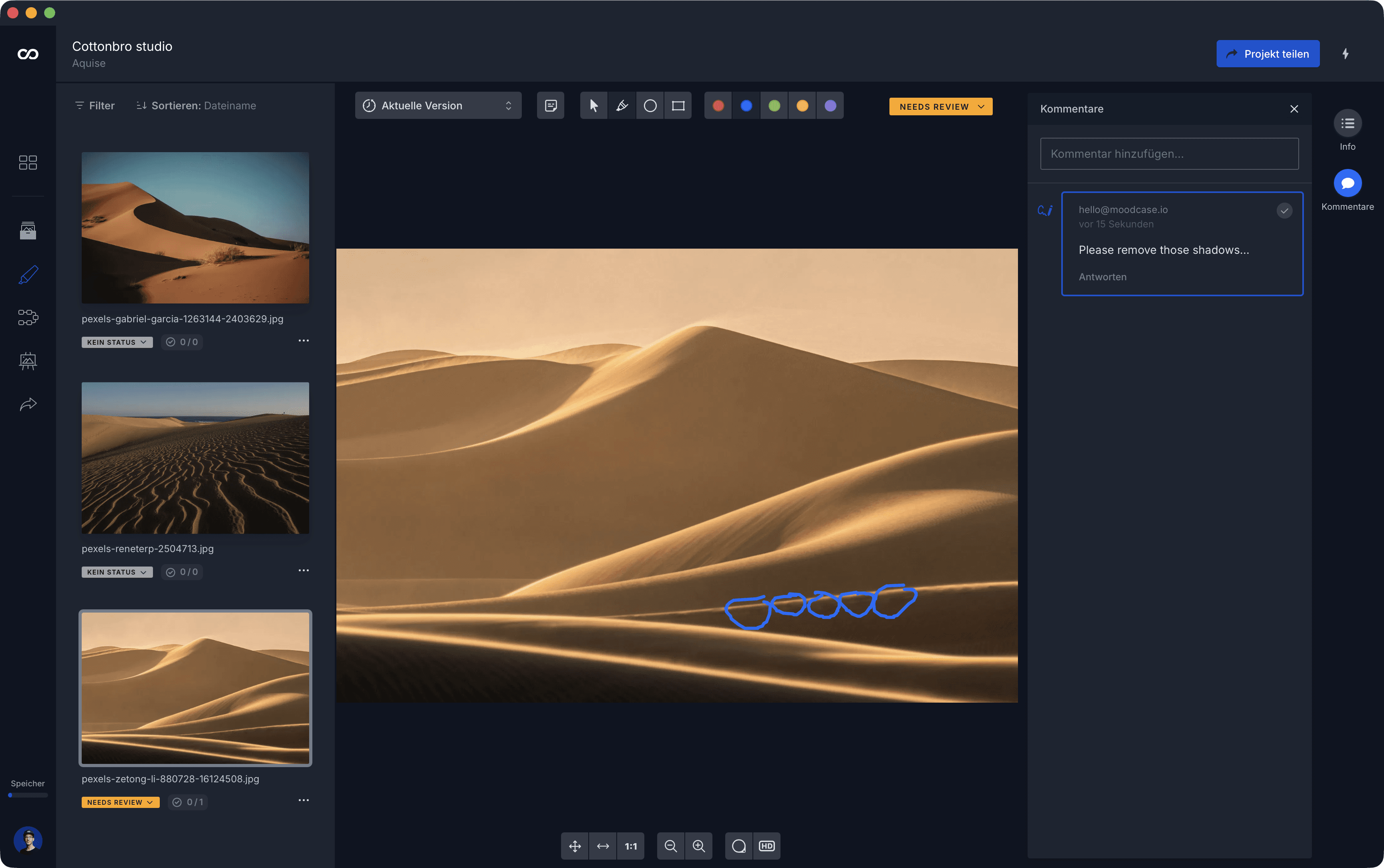
Keeping feedback on the image, not in a separate channel. When a client or team member reviews visual assets in moodcase, annotations are drawn directly on the image. Comments are threaded. Revision instructions stay attached to the asset across versions.
Recording decisions, not inferring them. Workflow states in moodcase track what was selected, what is in progress, and what is final. Approval is explicit. For a team managing visual assets across multiple clients and campaigns, knowing the status of every asset without checking messages or spreadsheets changes the operational clarity.
Delivering through the system, not around it. Branded galleries with controlled downloads, custom domains on higher plans, Quick Share ZIP for direct handoff. The client receives visual assets in a presentation that reflects the quality of the work.
Who moodcase visual asset management is built for
Agencies managing visual assets for clients. Multiple clients, multiple campaigns, multiple external stakeholders. The library grows across accounts. Structure needs to hold across projects and persist for re-use.
Marketing teams handling visual content for brands. Campaign photography, social media assets, event documentation, product visuals. The team is small but the volume and the number of people who touch the assets are not.
Photography studios with a growing library. Active project workflows alongside a library that accumulates over years.
Creative production teams coordinating with external partners. Photographers, retouchers, art directors, clients. Multiple people need access to the same visual assets with different permissions and different needs.
How this compares to enterprise DAM
Enterprise DAM platforms serve organizations with hundreds of users, brand governance requirements, multi-department distribution, and compliance workflows. These platforms are the right shape for that operational reality.
For a creative team of 5 to 20 people, the comparison is not about features. A structured visual asset system at this scale offers metadata, AI tagging, global search, access control, review and approval on the asset, and branded delivery. Enterprise DAM offers the same categories plus governance, multi-level permissions, automated distribution, and enterprise integrations.
The difference is in what the team will actually use. A team of twelve does not need automated distribution to a content management system. It needs to find assets, control access, collect feedback on the image, and deliver with quality. At that scale, the implementation timeline, configuration overhead, and pricing structure of enterprise DAM are working against the team, not for it.
Visual assets need more than a folder. See how moodcase handles the full workflow.
Try all features for 7 days. No credit card required.
Metadata
Search
Delivery
Creative Teams
Agencies
RELATED

Visual asset management without DAM overhead.
Shared drives stop working. Enterprise DAM is too much. moodcase is built for the gap where most small creative teams operate.
When file sharing stops working for visuals.
Shared drives store files. Visual assets need feedback, approval, and delivery. Where folders stop carrying the context.