Insights
— Platform
When marketing teams outgrow shared folders.
Marketing teams reach a point where shared folders stop being enough. The break is not announced. It happens slowly, then all at once. The instinct is to fix the folder structure. Rename, reshuffle, write down conventions. The real shift is different. Folders break for marketing teams not because the team is bad at naming. They break because folders cannot hold information about the asset itself.

Mathias Buschor
Co-Founder at moodcase
•
6
min read
Photo:
Nathan Van de Graaf
How the break happens
A marketing team starts with a clear shared-drive structure. Brand folders, campaign folders, photographer folders. Naming conventions written down in a doc. For a while, it works.
The first cracks appear when a single image needs to belong in two places. The hero shot from the autumn campaign is also the brand image that will run in the company report. The team duplicates the file. A revised crop appears later, and the duplicate is updated in one folder but not the other. Two truths now exist.
The cracks widen when external partners join. An agency needs a subset of the library. A retoucher needs access to specific assets. A regional team needs the campaign assets but not the brand archive. The team creates new folders, new shared links, new ad-hoc views. The folder tree starts to mirror the access requirements rather than the work itself.
By the time the team asks each other "where did we save the final crop again" three times a week, the structure has stopped serving the work.
Folders organize by name, not by attribute
Folders answer one question. Where is this file located. They do not answer the questions a marketing team actually asks.
What was approved for the autumn campaign and what was not. Which assets are cleared for external use. Which version is current. Which assets carry which usage rights and until when. Who has accessed what. Which photographer shot which set. What language a piece of copy belongs to. What brand identity it expresses.
These questions are not edge cases. They are the routine work of a marketing team handling a library that serves multiple campaigns, multiple brands, and multiple stakeholders over time.
Folders cannot hold any of this. A folder can be named to hint at it, but the hint sits in a string of characters that depends on every person writing the same conventions in the same way. The system has no way to enforce its own structure.
The threshold is about load, not headcount
The instinct is to imagine that folders break at a particular team size. They do not. A team of two can outgrow folders. A team of forty can keep folders functional for a long time if the work is narrow enough.
The threshold is the moment when the team realizes that finding, controlling, and reusing assets has become a job in itself. The work of administering the library starts to compete with the work the library is supposed to support.
The signal is operational, not structural. Time spent locating assets. Time spent recovering what was decided about a particular image. Time spent recreating something that already exists because no one could find the original. Once that time is non-trivial, the team has crossed the threshold whether or not anyone has named it.
External partners reveal the limits first
The clearest signal often comes from outside the team. An agency, a partner brand, or a contracted photographer asks for "all the approved assets for the spring product launch." The team begins to answer and finds that the answer cannot be assembled from the folder structure alone.
Which assets are approved. That state is in someone's inbox. Which versions are current. Maybe in a spreadsheet. Which assets are cleared for external use. In a separate licensing tracker. The folder structure delivered the files. Everything else required reconstructing the surrounding context from memory and side-channels.
External partners reveal the limits because they cannot operate on the team's tacit knowledge. They need the structure to carry the meaning.
From naming to structure
The instinct, when the folder system starts to slip, is to fix the folders. Better names. Stricter conventions. A new top-level. The work goes back into the same shape.
The actual move is different. It is the move from naming to structure. Naming is the user describing where something is. Structure is the system knowing what something is. Once the asset has its own attributes, the folder hierarchy stops being load-bearing.
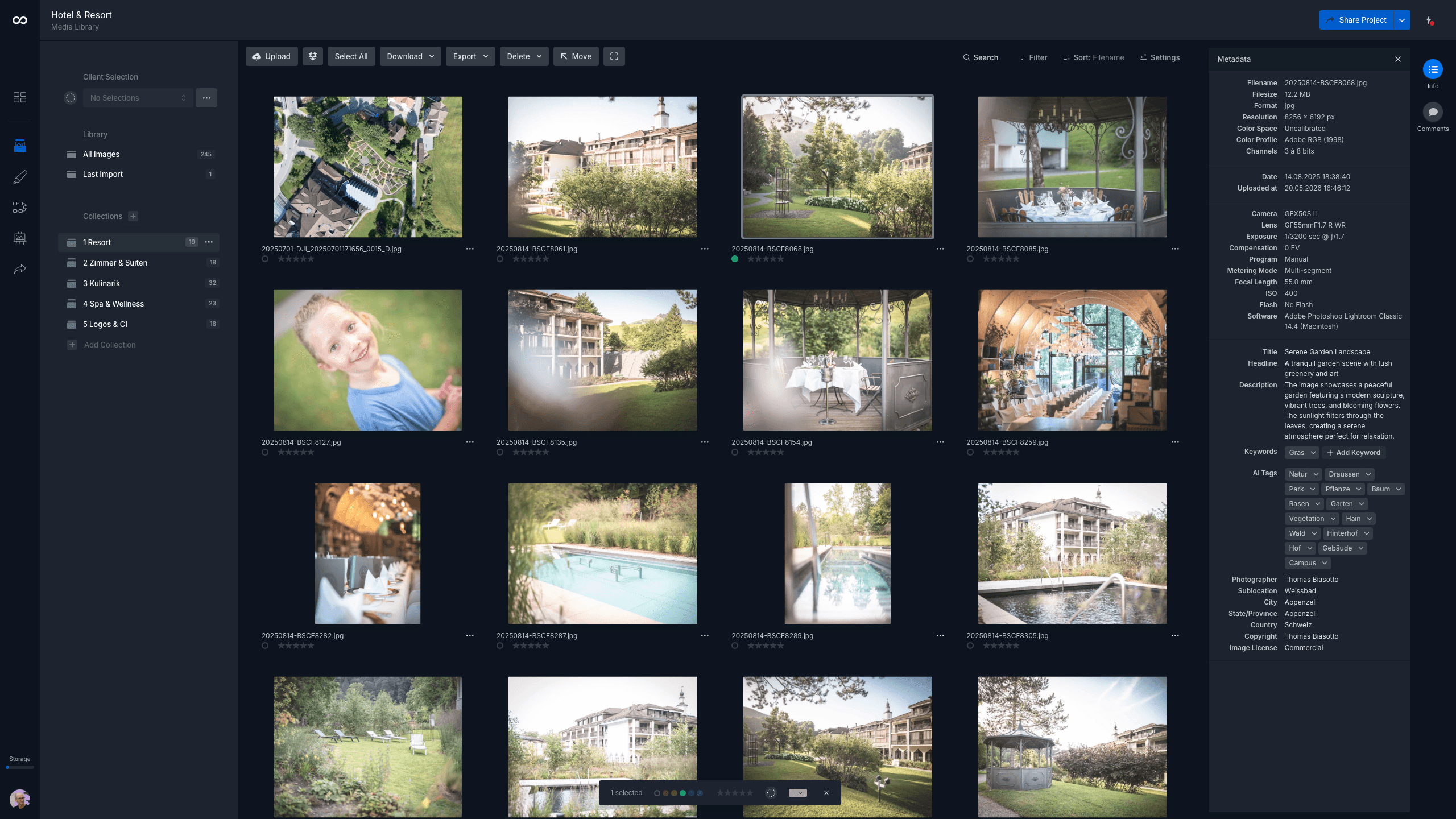
In moodcase visual asset management, this is how the library is built. Assets carry metadata applied at upload. AI tagging applies attributes at scale on team plans. Global search retrieves any asset by any of these attributes across the workspace. Collections define cross-cutting views without duplicating files. Access is granular, link-level, and recorded in the audit log.
What changes is not the team's discipline. The discipline was real all along. What changes is that the discipline is now in the system, not in the folder names.
Who this matters to
This matters when a marketing team handles multiple campaigns, multiple brands, or external partners over time. It matters less for a small team running one campaign at a time, where everyone touches every file and the load stays light.
The question is not whether folders should be retired. They are still useful as one kind of view. The question is whether the structure that holds the library together should be names a person wrote, or attributes the system knows.
Visual assets need more than a folder. See how moodcase handles the full workflow.
Try all features for 7 days. No credit card required.
Folder Limits
Metadata
Scattered Assets
Marketing Teams
RELATED

Visual asset management without DAM overhead.
Folders break for marketing teams not because the team is bad at naming. They break because folders cannot hold information about the asset.

Visual assets for small creative teams.
Shared drives stop working. Enterprise DAM is too much. moodcase is built for the gap where most small creative teams operate.